Unknown's avatar

LiteGame – Module System – Part 1

My first focus for LiteGame engine is the most broad kind of architecture, that of modules.  When I talk about modules I
reffer to things like the renderer, the sound system, sprite library, entity factory, etc.  The peices of code who’s job
is to manage a specific area of work.

A common pattern that I see in my programs is that many modules need their code to be executed in three main stages of
the application:

At startup        …onInit()
Once per frame    …onTick()
and before exit   …onFree()

In the past I have organized things loosely as follows:

#include "module1.h"
#include "module2.h"
// entry point
main( )
{
    // initalise modules
    module1_onInit( );
    module2_onInit( );
    // main game loop
    while ( game_is_running )
    {
        // update all modules
        module1_onTick( );
        module2_onTick( );
    }
    // release modules
    module1_onFree( );
    module2_onFree( );
}

It dawned on me when starting this engine that this is realy a very ugly structure.
Everytime we add a new module, we have to make changes to this file in four places.  On top of that,
we drag the header of each module into our main file, in order to access three of its functions.
Things become more complex still when we start locking the framerate, and load balancing these modules.

A nice solution would be to have some manager that can look after our collection of modules, and call their
functions at the correct times.  This also seems like a good place to insert timing code, so that we
can ensure that onTick() can be called at a set rate, giving us a constant tickrate.

An obstacle presents itself, as to how we register these modules at compile time, without any
one centralised point to explicitly register them.  I will present a solution, but please write to me if you
know any others, I would love to hear about them.

A nice solution is to (ab)use the way C++ initalizes static data, to execute code that will register
each module before the program even reaches main().  Observe the following:

struct sRegisterModule
{
    sRegisterModule( void (*onInit), void (*onTick), void (*onFree) )
    {
        module_add( onInit, onTick, onFree );
    }
};

Here we see a class that has only one method, a custom constructor that takes our module entry points as parameter.
When this module is contructed it will pass these functions to the module manager which will register a module, properly.

This doesnt seem all together so usefull until we see what happens when we include the following code inside of our module:

static sRegisterModule module1( module1_onInit, module1_onTick, module1_onFree );

Since module1 is a custom type, global static variable the compiler has to construct it at program launch.  Thus the constructor
is executed, and our parameters are passed to the module_add() function.  Thus we have found a smart way to give details about our
modules to the module manager in a distributed way.

Then our main() function can be reformed as follows:

#include "module.h"

main()
{
    module_initAll();
    while( game_is_running )
    {
        module_tick();
    }
    module_freeAll();
}

With this system a module is completely self contained, and simply needs to pull in the module manager library.  As far as I can see this is a nice basis to structure farther developments to the engine.

Unknown's avatar

Creating an open source game engine

As I write this Ludum Dare 28 is underway, and unfortunately I am not taking part.  I planned to, I wanted to, but I have had a terrible cold for the last few days, and all of my energy has been zapped from me.  It struck me that writing a game from scratch in C++ for Ludum dare is fairly hardcore, even with the likes of SDL to make things easier.  What would have been nice is a simple engine to take the pressure off me, so what little strength I have I could have put into just making a game.

That said, I love programming the tricky engine parts, and I don’t like using bulky, bloated off the shelf engines.  I want something I made myself.  So it seems that if I spend my time wisely, making a nice game engine, I could make something amazing next Ludum dare.

I have also received many emails and messages from people wishing that I can write some tutorials on making a game engine, from the bottom up, from the simple things, to the hard things.  So what is to stop me from satisfying these two goals, making an game engine, and documenting the process and my ideas along the way for other to read.  Perhaps others could also use my engine for similar events themselves.

https://bitbucket.org/AidanDodds/litegame

I have started a GIT repository, where I will push my code as it develops.  I will also document the main elements of the engine publicly here.

Lets hope this little project spawns some great games in the future!

Unknown's avatar

A strange plot

An idea came to me the other day, while I was writing some 2D drawing functions, specifically the timeless ‘plot’ function.  In case you don’t know, the plot function puts one pixel on the screen at a given location.

This is a function that has to be fast, because it is convenient to use it in some places such at line and circle drawing.  Image drawing on the other hand can be optimized in may ways making plot redundant for that use.

Here I will present a nice and generic plot function, that is useful when you cant optimize pixel writes, or are too lazy and just want to get on with other things.

A simple plot command may be as follows…

inline void plot( int x, int y )
{
    uint32 *pixels = screen_buffer;
    pixels[ x + y * screen_width ] = colour;
}

One problem that must be tackled with a plot function is this…  what if we draw off screen?  For instance with Plot( -1, -1 ).  In this case, the program has been asked to write to memory that it doesn’t own, and will cause all sorts of terrible bugs.

Well aha, we can fix it with the following code…

inline void plot( int x, int y )
{
    if ( x < 0 || x >= screen_width  ) return;
    if ( y < 0 || y >= screen_height ) return;
    uint32 *pixels = screen_buffer;
    pixels[ x + y * screen_width ] = colour;
}

That may have stopped us from crashing the program when a pixel is written off the screen but what might that do for the performance.  Branching is terrible in performance critical code, and this function may get called 1000+ times each frame.

I had an idea to help speed things up a little, by getting what we want, without the branches.Have a look at this code…

inline void plot( int x, int y )
{
    bool off_screen |= (x < 0);
         off_screen |= (y < 0);
         off_screen |= (x >= screen_width);
         off_screen |= (y >= screen_height);
         
    // 0xFFFFFFFF if on  screen
    // 0x00000000 if off screen
    int mask   = off_screen - 1;
    int index  = x + y * screen_width;
    int index &= mask;
    
    uint32 *pixels  = screen_buffer;
    
    pixels[ index ] = colour;
}

Here I have replaced the branch instruction with a mask operation.  In this case whenever we may write off screen, it will redirect the write to pixel [0,0].  Yay, now the program doesn’t crash anymore, and the performance shouldn’t suck too much.

There is however the problem of this distracting pixel in the upper left corner that may flash all kinds of strange colors now.  One hilarious solution is to do a final plot(0,0) with black, before you present the screen, giving up this pixel all together.  I would never be satisfied with that solution because it is just ugly.  A solution that I was able to use (because I am rendering to an intermediate screen buffer) is to allocate one more pixel then I need.  Change this one line, to have a + 1.

   int index  = ( x + y * screen_width ) + 1;

Every time I reference, the screen buffer, I first + 1 to the pointer to skip over the [0,0] pixel.  So, we treat the screen buffer as starting from [1,0], making the first pixel invisible and ofscreen.  Thus in effect, our masking operation ensures that it uses pixel (-1,0) for all off screen writes, which is legal memory now, but not visible.  The downside here is that a +1 of the screen buffer everywhere is still a bit ugly however.

Anyway, that’s my hopefully interesting take on the timeless plot(x,y) function…

Unknown's avatar

A Long overdue update…

A long time has passed since my last post here, largely because I was hired by a great software company, and I’m having a great time there!  I would like to point out that due to the nature of my work, I am bound by an NDA, so everything I write here pertains to my own personal projects and not the company’s.  That said… while I have less free time then usual, I still have a huge drive to work on projects in that which I do still have.

I am currently working on some awesome things, which I want to get around to documenting, such as:

  • Fast [quad / oc] tree ray casting using only bit shifts, for a voxel renderer, and a Fez clone.
  • Writing an embeddable Java Virtual machine as a scripting language for my game.
  • Refactoring and extending Fake86 emulator, to aid in writing boot loader games for the PC (largely through adding a debugger).

SonicAudio

On a different subject, I finally got some time to make UI mockups for some programs I want to write.  The first picture shows an 8 bit chip tune composer, which should map nicely to my sound engine I have already programmed.  My goal here was to take my love of Albeton Live and push that into a 320×240 resolution for a fixed sound system.  I have never likes the text interfaces of other 8bit ‘tracker’ music programs.

Synth

Incidentally here is a screenshot of the sound core, showing 4 waveforms: SAW, PULSE, SIN, and TRIANGLE.  An interesting feature is that each channel has independent bit crushing, which can be seen in channel 3, and 4.  Channel 5 is the LFO or vibrato oscillator, and channel 6 shows the white noise source.

pixelPaint

This is an incomplete mockup for a pixel editor I want to create.  I wanted to take my workflow from Photoshop and streamline it into a 320×240 program, with only the feature I use.

An interesting idea is to release both programs bundled together as a retro game makers app pack.  The sound engine for the chip tune composer could be released as a stand alone library, making it easy to plug into any games.

Also I found this a very interesting to read.  Someone has written up an explanation of a AI following and path planning system for platform games.  This is something I have often thought about myself, and feel it would be nice to experiment with in future.  Check it out:

http://www.ludumdare.com/compo/2013/11/24/path-planning-ai-in-platformer-games-a-layered-approach/

Unknown's avatar

Playing with MicroThreads

I recently bought Game Programming Gems 2 and was captivated by an article titled ‘Micro-Threads for Game Object AI’.

A really neat technique is describes that can performing very fast cooperative multitasking, also sometimes referred to as co routines.  The heart of this technique involves manipulating the processor stack pointer to switch between multiple contexts of execution.  Its very similar in concept to true multitasking, however each thread decides when to share the processor.  The concept is simple enough, but really so powerful and radically different from many other techniques for AI I have used.  I knew I would have to program up a text to play with this idea.  Using this method, each object in my game can pretend it is running in its own thread and I am sure this can find application elsewhere too.

The article provides a nice description, but doesn’t provide enough information to directly copy an implementation, and my copy arrived without the CD, but that is fine however and I am having fun of working it out my own.  I have made a few projects in the past which manipulated the CPU registers to perform various tricks, so I can build upon that knowledge.

My first implementation appeared to operate correctly until exit where my call to delete[] threw up an assert.  This is because the fake stack was getting sprayed with bad data somehow from within my virtual thread. I will be spending lots of time in the debugger until I find out the cause.

Update 1:

I believe that the debug run time version of printf() is writing past the end of the 1kb stack, causing a buffer overflow. Hmm….

update 2:

I went back and read the article all over again and there were many hints that I simply didn’t have enough stack space at all.  The author also proposed a very nice improvement, where we effectively extend the stack size by copying each micro thread into much larger stack before execution.  Thus the Micro Thread code can make use of a large stack space, but individually they only take up a small amount of space.  After execution, we extract the smaller part of the stack again.  This places the limitation that _yield() cant be called deep in some code in the thread, but that is hardly a restriction at all.

Here is my demo code for anyone that want to have a look at its implementation.  I wrapped it up with a little API as well so it should be somewhat readable.

microThread.cpp

update 3:

My brain must have been thinking of improvements overnight since I woke up with three ideas I had to experiment with. In each case it was to address the stability and protect against stack overflows. The most major improvement is the use of VirtualProtect(), which is used here to set the bottom of the shared stack region to a guard page. This wastes 4k of stack space, but it is well worth it since now a nice exception is thrown if we write to the stack anywhere in the bottom 4k.

The second improvement, is to check the value of the stack pointer upon return from a micro thread. If it falls within the space allocated to each thread then everything is fine, otherwise we will need to allocate more stack space for that thread. If this check fails, and esp lies outside of our thread space, then we can be sure that we wont be saving all of that threads state during the task switch. That would lead to very very bad things.

A final improvement is to address what happen when the micro thread function returns. Currently, there is no return address on the stack, so execution could jump literally anywhere.
The solution is to ensure that we have a valid address for this function to return to. We can set the return address to a custom function that can handle the situation on one of two ways. We can setup the stack and processor state so that it will execute the micro thread function once more, thus it will feel like our micro thread function is permanently called. Alternatively we can mark that thread as finished, switch back to our main thread, and then kill the micro thread cleanly. Since both options have merit, I will implement both of then and let the user specify the handling during thread creation.

update 4:

I am now playing with Vectored Exception handlers to see if I can recover from stack overflows, and automatically terminate a malfunctioning thread.  I have confirmed that an exception is being thrown when I intentionally overflow the stack from within a micro thread.  It shouldn’t be too hard to switch the context back from within a vectored exception handler.  I remember having played around with something similar, having self modifying code from an exception handler if a debugger is detected.  According to the original article, it states that structured exceptions no longer work correctly from micro threads since no handlers are on the stack, perhaps this is something I can look into addressing also.

update 5:

Here is the latest version of the library provided as a source release.  The vectored exception handler really works amazingly well, terminating any micro thread that attempts to overwrite its stack.  If a micro thread returns from its function, the thread will terminate as well.  There are many more stability improvements and validity check making this quite a viable option for use in any project now.  I have included a small test program also so that the functionality can be demonstrated.

https://www.dropbox.com/s/z0pv24ul3szifsc/microThreads.zip

Unknown's avatar

Lode Storm First Released

screenshot

This marks the first real release of lode storm for this Mini Ludum Dare!

I spent most of this morning adding sound and some music to the game.  My girlfriend and I recorded the voice overs and I composed the music too.

I will later add in a win condition check and extra levels too.

Grab a copy using this link: https://www.dropbox.com/s/vlloxiks83hc890/lodestorm_v0.2.zip

My Ludum Dare page can be viewed here: http://www.ludumdare.com/compo/minild-44/?action=preview&uid=20953

Unknown's avatar

Lode Storm – Implementing classic fog of war

Last night I couldn’t sleep, and one of the reasons was that my mind was busy trying to explore the problem of how to implement FOW in my game Lode Storm for this months 7 day mini Ludum Dare.  I got up again and at 1:30am set about solving this problem in a nice manner.  After about two hours, the results looked suitably retro and I had some fun designing a neat algorithm in the process.  Here is the result:
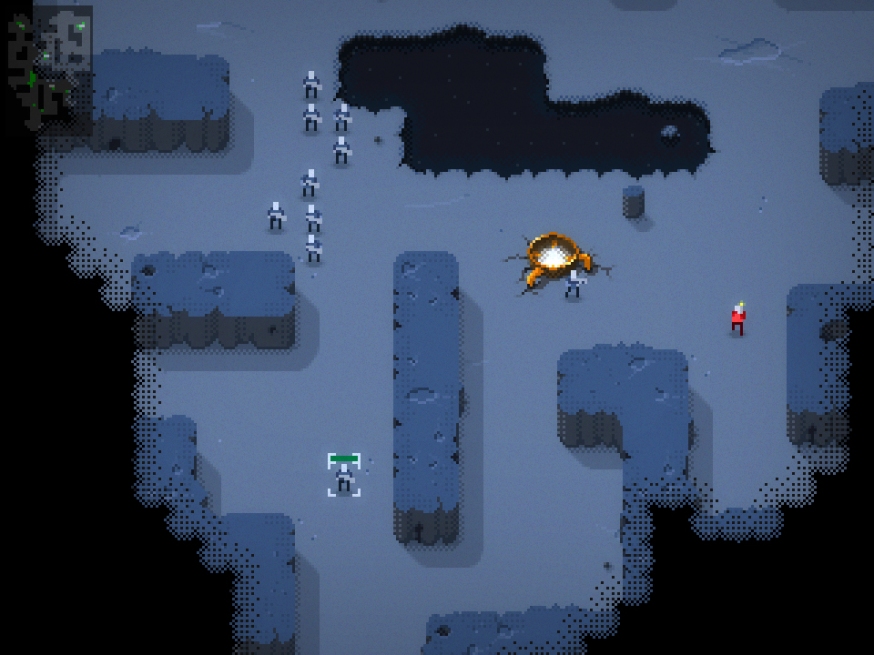
fogofwar

Any RTS game aspiring to the classics of the genre would not be complete without some Fog of war (FOW) effect.  Warcraft Orks and Humans is a game that very much rely on FOW, and has a great rendering style for it too.  I took this as my basis and set out to mimic the visual effect.

It is immediately obvious that in this case, the FOW is just another tile map, as an overlay to the main game map.  While each tile is either in fog or not (binary), some extra processing has occurred to make a visually smooth transition around the hard boarder.

The stages seem evident:

  1. Within the game logic update the binary FOW map
  2. Process the binary FOW map to derive a visual FOW map
  3. Render using the same process as a regular tile map

Stages 1 and 3 are quite clear and shouldn’t require much discussion.  Stage 2 is however much more illusive and I will show you how I solved that in just a moment.

For stage 3 we require a visual overlay that will be rendered with a transparency mask to provide a pixel dissolve effect for the transition.  I spent some time in Photoshop and knocked up the following map:

Image

All of the tiles needed for a complete FOW effect are there, and in fact there is a little duplication in the corner tiles, but that is not important.  In stage two we need to take the binary FOW map and through analysis of each game time, produce and index corresponding to a tile in this image.

For stage 2, a few ideas to explore came to my mind.  I remember coding up a demo that performed terrain analysis using a Sobel filter, a very similar operation, however that code was written long ago and is on an eternal hard drive I don’t have access to at the moment.  Browsing over the Wikipedia page, it wasn’t immediately clear to me how to approach the problem with a Sobel filter.  The second option that came to mind is to employ a variation of the Marching Squares algorithm.  I haven’t programmed anything using this technique before, however it has always been something I have kept in mind to try one day.

As I understood it Marching squares assigns a unique code to each tile based on the tile values sampled at each corner.  To clarify this point, for each corner of the a tile we set it to true if it touches any other tile that is in FOW, otherwise false.  The image below shows that if any of the yellow squares have their bit set in the FOW map, then the corresponding code will be set to true.  This can be done by summing each tile around the corners using a bit wise OR operation.
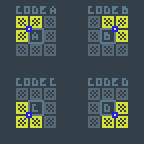
marchingsquarescode

Once these four Boolean values for the quadrants A, B, C and D have been found, we can proceed to produce the marching squares code.  This can simple be done by shifting and summing each of the bits, to produce 16 possible values.  Therefore the output value would be:

int out = (A<<3) | (B<<2) | (C<<1) | D;

The last step is to take the marching square code and use a translation table, mapping each marching squares code to a FOW image index.

In the end here is the code I came up with.  Please note that, ‘conv’ is the conversion table for the marching squares code to the image map.  In the current version of Lode Storm I used a modified version of the above FOW image, so it does not correspond to that.  You will notice that I perform a binary AND with 0x8, in the final step of my marching squares code computation, and this is because my FOW map is stored in one bit of a larger array of flags for each tile, so the 0x8 isolates only the FOW bit.

//
// tile byte flags layout
// 
//    0xF                  0x0
//    Z  L  0  0  H  C  W  E
//
//  0x80 - Z - tile locked for units    (unit on tile)
//  0x40 - L - lode locked              (lode on tile)
//  0x08 - H - human fog of war         (binary, not the aesthetic map)
//  0x04 - C - computer fog of war        " "
//  0x02 - W - water                    (block move not LOS)
//  0x01 - E - elevation                (block move and LOS)
//
//
//
inline int fog_getIndex( int x, int y )
{
    // marching squares conversion table
    uint8 conv[] =
    {
        13,  1,  0,  8,
         2, 13, 10,  4,
         3,  9, 13,  5,
        11,  7,  6, 12
    };
    // convenience
    uint8 *t = tile_flags + (x + y * 32) - 33;
    // surrounding squares
    uint8 q[ 8 ] =
    {
        t[00], t[01], t[02],
        t[32],        t[34],
        t[64], t[65], t[66]
    };
    // sum to find out quadrant values
    int a  = q[0] | q[1] | q[3];
    int b  = q[2] | q[4] | q[1];
    int c  = q[7] | q[6] | q[4];
    int d  = q[5] | q[3] | q[6];
    // turn into marching square code
    int v  = (a & 0x8) >> 0;
        v |= (b & 0x8) >> 1;
        v |= (c & 0x8) >> 2;
        v |= (d & 0x8) >> 3;
    // index conversion table
    return conv[ v ];
}

Additionally, there is one small omission from the code above.  If a tile has its FOW bit set in the FOW map, then it should immediately skip this processing and be set to straight black.  Tiles should only be processed using the above method if they are not part of the hard FOW.