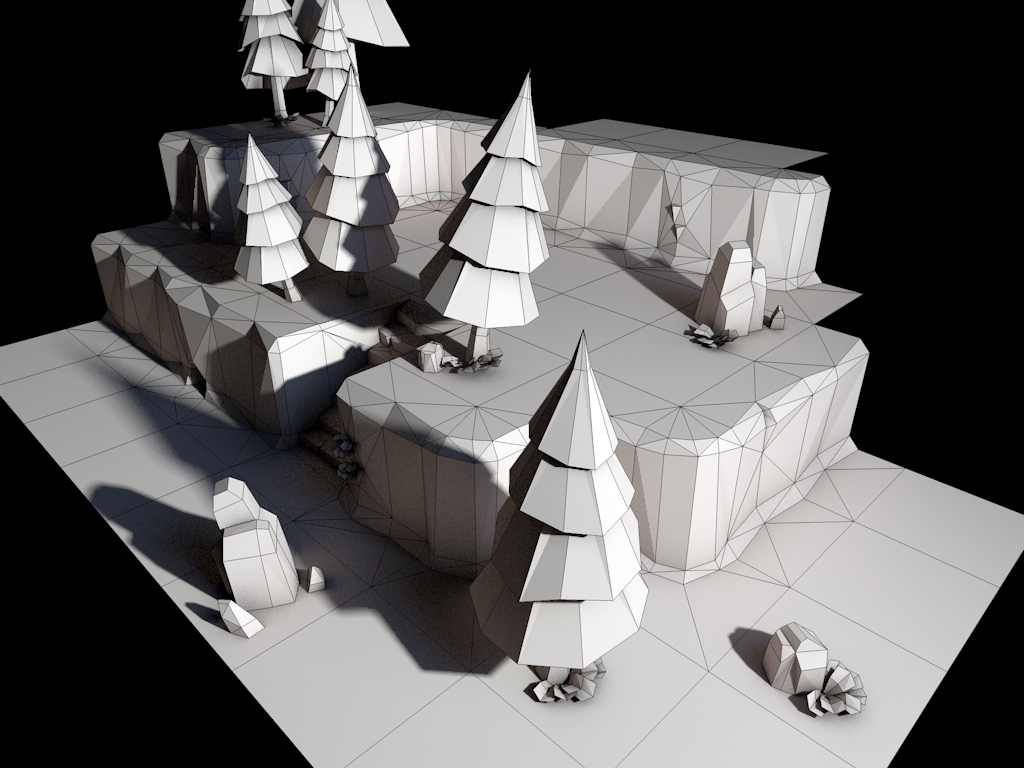
Procjam (Procedural Generation Game Jam) is coming up very soon, and I’m going to take part. I have started to prototype some things to see if my idea is feasible. So far I have been playing around with different ways to software render a unit sphere. I’ve got some funky ideas for these things.
Rapid multi agent pathfinding
I have been trying to design a good path finding algorithm that will support a large number of agents by default. A* is not very good at supporting more then once agent at a time, where their paths may intersect, and can require lots of fudges to get it to work correctly in these situations. Also when A* is implemented over a grid based world, it can require additional processing to produce non grid aligned paths (path smoothing).
For this demo, I threw A* out of the window and took a potential field approach. I used bi-linear interpolation when sampling the potential field so that each agent wouldn’t have to be grid aligned. The results are really cool, and I can simulate upward of 1000 agents without any performance hit. Perfect for a nice hack and slash dungeon crawler.
Coroutines, x64 and Visual Studio
I really like co-routines, finding them really useful for programming game AI and scripting. Since visual studio has dropped support for inline assembly when compiling x64 code I thought I would be out of luck trying to implement co-routines for this target. Fortunately visual studio can still compile assembly files using masm in x64 mode. In order to implement co-routines I had to familiarities myself with x64 calling conventions, something that has changed quite a bit from x86. The first 4 arguments are passed on the stack, there are many more callee save registers, and more obviously all registers and pointers have been extended to 64bits.
Below is a small demo showing how to implement co-routines in visual studio for x64 targets.
#include <stdio.h>
typedef unsigned long long u64;
typedef void * user_t;
typedef void *stack_t;
typedef void (*cofunc_t)( stack_t *token, user_t arg );
/* coroutine functions */
extern "C" void yield_( stack_t *token );
extern "C" void enter_( stack_t *token, user_t arg );
/* artificial stack */
const int nSize = 1024 * 1024;
static char stack[ nSize ] = { 0 };
/* prepare a coroutine stack */
void prepare( stack_t *token, void *stack, u64 size, cofunc_t func )
{
u64 *s64 = (u64*)( (char*)stack + size);
s64 -= 10; // 10 items exist on stack
s64[0] = 0; // R15
s64[1] = 0; // R14
s64[2] = 0; // R13
s64[3] = 0; // R12
s64[4] = 0; // RSI
s64[5] = 0; // RDI
s64[6] = (u64) s64 + 64; // RBP
s64[7] = 0; // RBX
s64[8] = (u64) func; // return address
s64[9] = (u64) yield_; // coroutine return address
*token = (stack_t) s64; // save the stack for yield
}
/* coroutine function */
void threadFunc( stack_t *token, user_t arg )
{
for ( int i=0; i<10; i++ )
{
printf( " coroutine %d\n", i );
yield_( token );
}
}
/* program entry point */
int main( )
{
stack_t token = nullptr;
/* prepare the stack */
prepare( &token, stack, nSize, threadFunc );
/* enter the coroutine */
enter_( &token, (void*)0x12345678 );
/* simple test loop */
for ( int i=0; i<10; i++ )
{
printf( "main thread %d\n", i );
yield_( &token );
}
/* program done */
printf( "program exit\n" );
getchar( );
}
Coroutine.asm
.code
;---- ---- ---- ---- ---- ---- ---- ----
; coroutine yield function
;
; : void yield_( void * token );
;
; 'token' -&gt; RCX
;
yield_ proc
push RBX
push RBP
push RDI
push RSI
push R12
push R13
push R14
push R15
mov RAX , RSP
mov RSP , [RCX]
mov [RCX], RAX
pop R15
pop R14
pop R13
pop R12
pop RSI
pop RDI
pop RBP
pop RBX
ret
yield_ endp
;---- ---- ---- ---- ---- ---- ---- ----
; enter a co-routine
;
; : void enter_( void * token, void * arg1, ... );
;
; 'token' -&gt; RCX
; 'arg1, ...' -&gt; RDX, R8, and R9
;
enter_ proc
jmp yield_
enter_ endp
end
Procedural level generation
Arduino controlled YM2149
Years ago an Atari ST came into my possession. I had a play with it for a while, but at the time I didnt appreciate it, and unfortunately I tore it apart collecting all the parts and finding out how it worked in the process. I recently had the urge to play with the sound chip of this computer, the YM2149. This chip, like many others (SID, ..) was designed to be memory mapped to the main CPU of a computer, and so has an address bus and data bus and is controlled by writing data to the chips address space. To control the YM2149 I used an arduino nano, which in turn is controlled by my PC from the virtual serial port. The arduino takes serial commands and translates them into valid address and data writes for the YM2149.
The circuit I built can be seen below:
Many others have built very simmilar circuits but with one major difference, the clock. The YM2149 requires a constant clock of 4Mhz in order for it to generate any sound. Without this clock it would also not be able to remember any data that has been written to it, which it typical for old ICs. Most other circuits I had looked at use an external crystal controlled oscillator to generate the required clock. For such a low frequency, it is a simple circuit that can be build using any basic logic inverter IC. I dont like this for a couple of reasons however; it increases the parts count of the project and this 4Mhz oscillator and the 16Mhz oscillator of the arduino will drift and never be in perfect lockstep. The lockstepping issue can make fast control of the YM2149 unreliable, as data writes and accesses may take a difference number of cycles to complete.
I chose to use the timer circuit build into the AtMega328p to divide its 16Mhz clock down to 4Mhz and output it directly to the YM2149. In theory this creates a perfectly lockstepped clock for the YM2149 so that chip access will be predictable and reliable.
In order to give the sound chip some work to do, I chose to send it register dumps, which are a great way to record music for such chips. A register dump file, contains a snapshot of the YM2149s registers at a frequency of 60hz. If I write these register values to my chip also at 60hz, then it should produce a fairly good reproduction of the recorded music. I managed to find a program written in C# which already parses the popular YM music format, and will pipe the register values down the serial port for me. All I had to do was program the Arduino to forward these on to the YM2149 correctly and I should be able to hear some nice chiptunes.
I have recorded my setup reproducing some music from the classic game Zool, which can be heard below:
Fuzzy Compression
I recenty programmed a very strange and almost worthless image compressor for fun.
The image on the left is 230400 bytes and when reduced to greyscale takes up 76800 bytes. The image on the right was reconstructed from 3072 bytes… thats 4% of the original size. The compression time was somewhere in the region of an hour running on a single core. It is very very lossy.
The process is fairly cool however. The compressed image is reconstructed by performing 512 random walks over the screen, each leaving a pixel trail behind. If the start locations and random number seeds for each random walk is computed correctly then the final result can be trained to produce any desired image. The training I used for this demo was a very basic genetic algorythm / progressive refinement technique. I imagine if left to its own devices to learn for a few days, the output image could look much cleaner, but I dont have that kind of patience.
The concept has been done before and much better:
see here: http://www.pouet.net/prod.php?which=62917
It seems the creator of this demo managed to fit that into 256 bytes including the unpacker. Here are some of the things he says about his demo:
There are 64 pseudo random brush strokes of cycling color. Each stroke is shorter than previous to increase details. Intro code generates set of random numbers starting from initial 32bit seed with Galois LFSRs as a PRNG. This set is used to control direction of brush movement and and starting position. Each stroke has initial 16bit value that influences the seed. Therefore data is 4 bytes (initial seed) + 64*2 bytes of stroke PRNG seeds. Picture of Mona Lisa (3072 bytes) was compressed to those random brush strokes by external optimization program (a few days of work for modern CPU/GPU combo). The process can be seen as lossy compression (23x) of picture into random brush movements.
The seeds were found with iterative brute-force approach. Each brush stroke is a layer which covers the previous one, therefore is mostly independent in calculations. For each layer there is a 16bit seed to be found that generates the best picture possible. Therefore there are 64 layers * 65536 possible values per layer and the program iterates through all of them (4 million of combinations – acceptable). This should be done for each initial 32bit seed (means *4 billion combinations) but can be performed in parallel. I’ve checked only a few thousands of randomly chosen initial seeds to find a nice looking picture. Details mask had to be used to multiply difference error on critical parts of the picture (eyes, nose, mouth). Otherwise too many details were put in the background.
Minecraft 4K C++ Port
A while ago I discovered Minecraft4k, a java demo written by Notch fitting into a 4kb object file. He used software raycasting to rasterize a large 3d array of voxels. The original demo can be played here as an applet:
https://mojang.com/notch/j4k/minecraft4k/
At the same time I found that Notch had made a Javascript port of the same basic engine, minus user input.
One awesome thing about these two demos is that all of the textures are synthesized proceduraly for space saving reasons.
Seeing his work, I got a strong urge to port the code to C++ and SDL.
Grab the source code here:
Retro CRT Shader
extern number time;
vec4 effect( vec4 color, Image tex, vec2 tex_uv, vec2 pix_uv )
{
// per row offset
float f = sin( tex_uv.y * 320.f * 3.14f );
// scale to per pixel
float o = f * (0.35f / 320.f);
// scale for subtle effect
float s = f * .03f + 0.97f;
// scan line fading
float l = sin( time * 32.f )*.03f + 0.97f;
// sample in 3 colour offset
float r = Texel( tex, vec2( tex_uv.x+o, tex_uv.y+o ) ).x;
float g = Texel( tex, vec2( tex_uv.x-o, tex_uv.y+o ) ).y;
float b = Texel( tex, vec2( tex_uv.x , tex_uv.y-o ) ).z;
// combine as
return vec4( r*0.7f, g, b*0.9f, l ) * s;
}
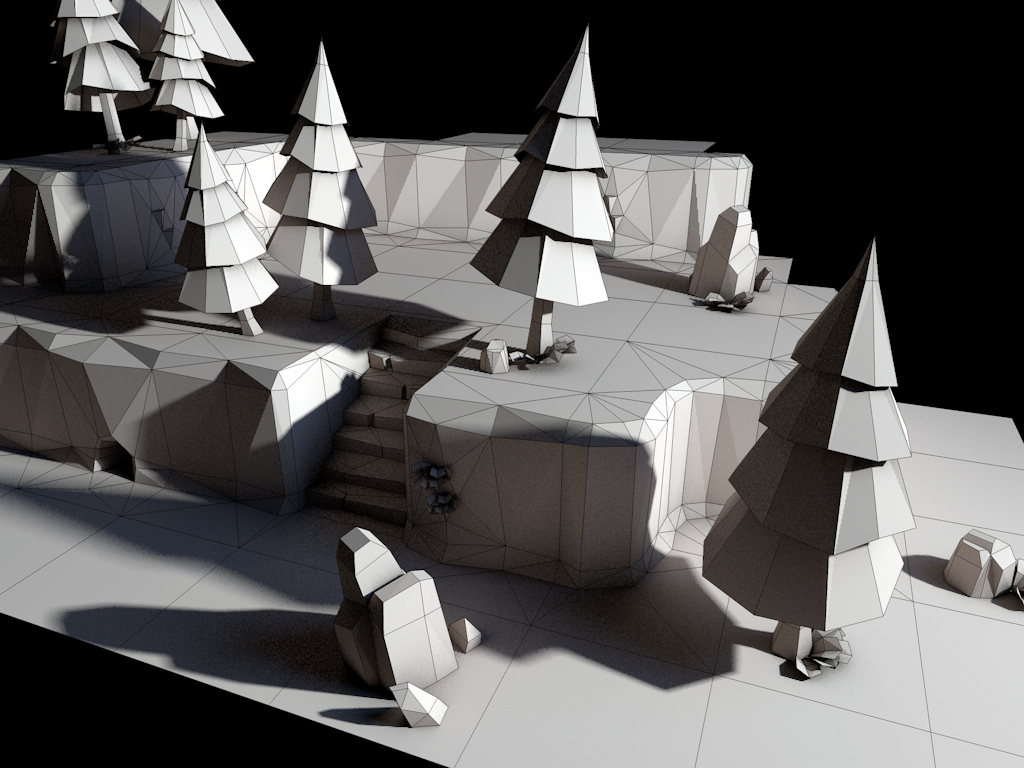
3D Tile Set
Fez PAK file Unpacker
I really like the game Fez for so many reasons and I am also the kind of guy that likes to take apart the things I like in order to understand them better.
This morning I decided to poke around at the data for Fez and see what I could discover. As it turns out there are only like 3 files, large ones (~150mb), with the extension ‘.pak’. For games, these large ‘.pak’ files are often used to collect many small game assets into large files, which has many advantages, such as easier distribution, faster loading, file system abstraction and patching.
Opening up ‘Essentials.pak’ in HxD hex editor, I saw the following:
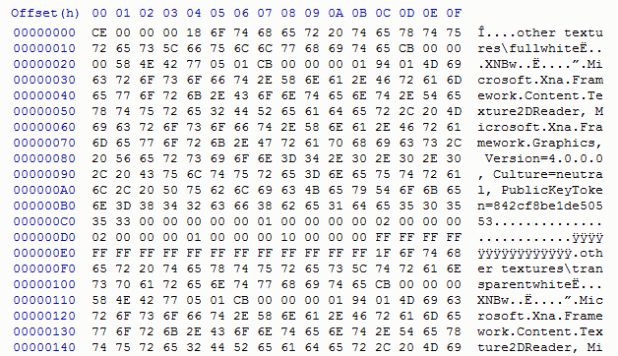
The abundance of strings was a good sign tipping me off that this data is not compressed in any way, making my job of extracting the files vastly easier. The first thing I went after was the path ‘other textures\fullwhite’ since it seems like the name of the first file in the ‘.pak’ file. The string was missing a null terminator, so the size must lurk somewhere else. Preceding the string, was a singe byte 0x18, which sure enough matched the length of the string. I now understood the name of each file in the ‘.pak’, but I still need to know the length of the file itself. Scanning down the file, I can see what looks like the start of another entry, which is good, since it gives me an idea of the length of the first file. The next file starts at 0xE0, so the length of the file must be smaller, and smaller still when we remove the size of the name and ‘.pak’ file header. In total I expect it to be around 0xC0 in size, and sure enough after the string there is 4 bytes with 0xCB.
Its worth noting that any assumptions I make I am sure to verify by looking at other entries in the ‘.pak’ file and seeing if the rules I can see still hold tight. In this case, they do!
I could write a program to start extracting data out of the ‘.pak’ file until it fall off the end of the file, but there will most likely be a way to find the number of files within this ‘.pak’ file. Most likely it is at the start of the file, generally known as a header. The rest of the file has been very simple so I wouldn’t expect this to be any different, the first 4 bytes seem suspiciously close to being a file count.
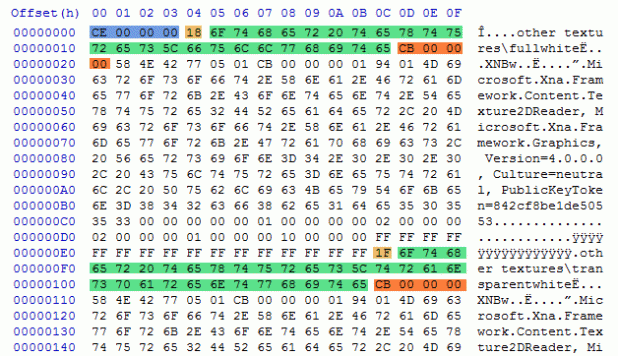
Below I have colored the hex view to highlight the interesting parts. In blue is the file count. Light orange is the string length. Green is the file name and path. Darker orange is the file size in bytes. The data between two entries is the file data itself.
It didn’t take long to code up a simple extractor for these ‘.pak’ files. Some of the goodies inside are all of the stems for the music tracks stored as Vorbis (ogg) streams. These have no file extension, but VLC is able to figure out how to play them just fine. I will in time try to poke around at texture, trixel and the map data.
The source can be found here: FezUnpack.cpp
An executable is here: FezUnpack.exe